Recent posts
#31
Mod Releases and Conversions / Re: NosbornGG's MUA3 mods
Last post by NosbornGG - October 26, 2026, 05:25AM
#32
Mod Releases and Conversions / Re: NosbornGG's MUA3 mods
Last post by NosbornGG - October 25, 2026, 02:21PM
#33
Mod Releases and Conversions / Re: KyleCalibur15 Mod Releases
Last post by KyleCalibur15 - October 24, 2026, 09:06PM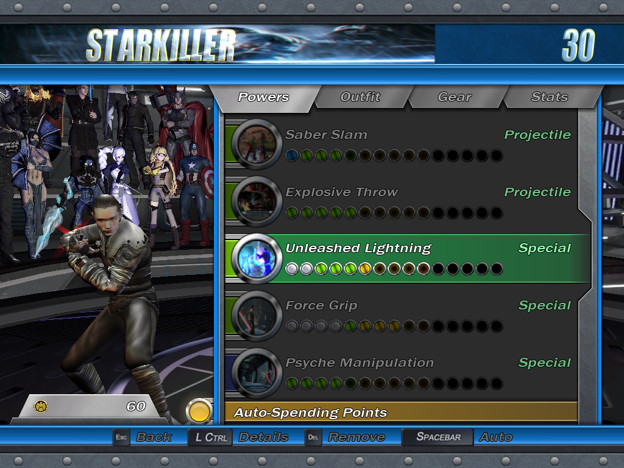
Starkiller—The Force Unleashed Booster
Hey y'all! Another Star Wars booster for y'all. Growing up, I was a huge Force Unleashed fan. I played the Wii version, the PS2 version, PS3 version, Ultimate Sith Edition, and even went on to read the trade paperback novelization and comic adaptation of the first game. As such, figured I'd try my hand at giving Starkiller a bit of a boost and put my on spin on the character out there for y'all to enjoy

Features:
Reverse lightsabers like in Force Unleashed 1 and 2
New saber models matching Starkiller's from the first game (and bonus blue lightsabers for those wanting to better reflect his more light-sided appearance in both games)
Reworked animations and effects for some powers and attacks
New melee animations from the Atlantean enemies in the game, giving him flashier and more dynamic lightsaber combat
Removed certain powers like his Dun-Moch, Sith Seeker, and Saber Dash powers to reduce triggers.
Removed Force Fury XTreme and replaced it with a buffed version of his base Force Repulse power, giving him a flashy and dynamic finishing move that pays homage to his Repulse's destructive power from the Force Unleashed 2 cinematic trailers!
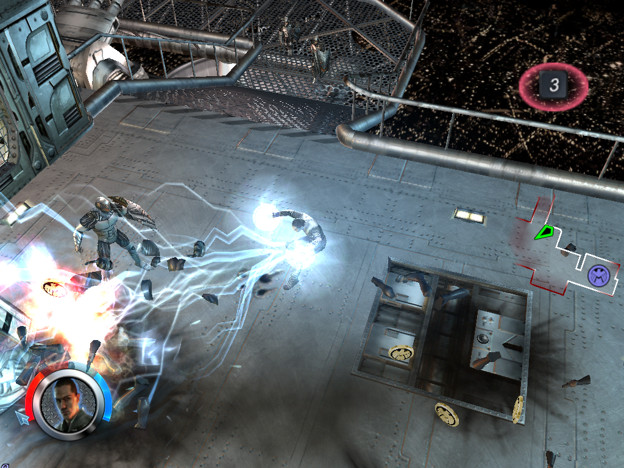
Added new Unleashed Lightning power, letting Starkiller release storms of Force Lightning on those unfortunate enough to stand in his way, using assets from Jonohood's Thor mod and Magneto's animations to reflect his lightning animation in the original two games.
Original Mod (Required First): https://gamebanana.com/mods/615171
Download Link: https://mega.nz/file/aBMylTbK#O8G0GdFYi3PlLugf15AXwHzFQO1BrW5Iea8ofPO12mQ
Credits:
Ceamonks: Original mod, power effects/assets from original Luke Skywalker mod
Professor Escanor: Starkiller Saber Files and Template
Hannah: Blue Ahsoka sabers
nikita488: Converted Starkiller Saber Conversion for Offhand Saber
Jonohood: New Lightning Effect
#34
Mod Releases and Conversions / Re: NosbornGG's MUA3 mods
Last post by NosbornGG - October 24, 2026, 10:39AM
#35
Mod Releases and Conversions / Re: Guiguis Skin; Anime, LOL, ...
Last post by Guiguis - October 23, 2026, 01:46PMRED TORNADO MOD

Download : https://www.mediafire.com/file/53eag9mtehcm34l/RED_TORNADO_V0.99.rar/file
Hello Friends, this is A new Mod using the Tommyboy as the base.I Changed almost everything so is a standlone mod.
Credits to :
Tommyboy for the original mod,
Aventureiro Max for the skins,
Kammy for the custom "Red ion buddie" for the 4 skin.
Jhood for some effects and codes.
NOTE HE DOESNT HAVE SOUNDS YET. So yeah thats the 0.99 .
Powers
P1: Upper Winds: Creates a small tornado beneath enemies, launching them into the air and dealing physical damage. Charging the attack increases its damage and knockback.
P2: Aerokinesis: Summons a tornado beneath a target to lift and throw enemies and objects. Can manipulate both heavy and massive objects, dealing wind damage during the lift and physical damage upon impact.
P3: Tornados: Creates a powerful, expanding wind vortex that traps, lifts, and throws enemies and objects around. Holding the ability and rotating the left stick increases the tornado's radius and area of effect.
P4 : Red Force Winds: Spins his arms to generate miniature tornadoes around his hands, creating powerful gusts that repel nearby enemies while continuously dealing damage.
P5: Tornado Fury: Spins rapidly, generating a powerful whirlwind that lifts all nearby enemies into the air while continuously dealing wind damage.
P6 (Boost): Hardened Wind Armour: Surrounds Red Tornado with a pressurized cyclone that absorbs elemental, energy, and radiation damage. The swirling winds also damage enemies who come into contact with him.
P7 (boost): Tornado Punches: Infuses Red Tornado's melee attacks with additional wind damage. This enhancement can also be shared with nearby allies, empowering their physical strikes with elemental wind energy.
XTREME : The Red Tornado: Summons a massive red tornado that unleashes Tornado Elementals to attack enemies and deal physical damage.
Download : https://www.mediafire.com/file/53eag9mtehcm34l/RED_TORNADO_V0.99.rar/file
Hello Friends, this is A new Mod using the Tommyboy as the base.I Changed almost everything so is a standlone mod.
Credits to :
Tommyboy for the original mod,
Aventureiro Max for the skins,
Kammy for the custom "Red ion buddie" for the 4 skin.
Jhood for some effects and codes.
NOTE HE DOESNT HAVE SOUNDS YET. So yeah thats the 0.99 .
Powers
P1: Upper Winds: Creates a small tornado beneath enemies, launching them into the air and dealing physical damage. Charging the attack increases its damage and knockback.
P2: Aerokinesis: Summons a tornado beneath a target to lift and throw enemies and objects. Can manipulate both heavy and massive objects, dealing wind damage during the lift and physical damage upon impact.
P3: Tornados: Creates a powerful, expanding wind vortex that traps, lifts, and throws enemies and objects around. Holding the ability and rotating the left stick increases the tornado's radius and area of effect.
P4 : Red Force Winds: Spins his arms to generate miniature tornadoes around his hands, creating powerful gusts that repel nearby enemies while continuously dealing damage.
P5: Tornado Fury: Spins rapidly, generating a powerful whirlwind that lifts all nearby enemies into the air while continuously dealing wind damage.
P6 (Boost): Hardened Wind Armour: Surrounds Red Tornado with a pressurized cyclone that absorbs elemental, energy, and radiation damage. The swirling winds also damage enemies who come into contact with him.
P7 (boost): Tornado Punches: Infuses Red Tornado's melee attacks with additional wind damage. This enhancement can also be shared with nearby allies, empowering their physical strikes with elemental wind energy.
XTREME : The Red Tornado: Summons a massive red tornado that unleashes Tornado Elementals to attack enemies and deal physical damage.
#36
Rules and Information / Re: News Bulletin Board
Last post by Outsider - October 22, 2026, 08:47PMEveryone, we've received word from THX that the forum website is now completely up to date and that verification emails at the forum are being sent out correctly.
In addition, we've added 18 new emojis to the website for everyone to use, consisting of: Adam Warlock,
  CM Carol Danvers,
  Crystal,
  Dazzler (updated),
  Elsa Bloodstone,
  Falcon,
  Ghost Rider (updated),
  Kate Bishop,
  Luna Snow,
  Morbius,
  Penance,
  Red Hulk,
  Sentry,
  Songbird,
  Spider-Man 2099,
  Spyke,
  Venom MUA2, and
  Winter Soldier. This means we now have emojis for every playable character from all five of the Marvel Ultimate Alliance & X-Men Legends games.
In addition, we've added 18 new emojis to the website for everyone to use, consisting of:
Adam Warlock, CM Carol Danvers, Crystal, Dazzler (updated), Elsa Bloodstone, Falcon, Ghost Rider (updated), Kate Bishop, Luna Snow, Morbius, Penance, Red Hulk, Sentry, Songbird, Spider-Man 2099, Spyke, Venom MUA2, and Winter Soldier. This means we now have emojis for every playable character from all five of the Marvel Ultimate Alliance & X-Men Legends games. #37
Mod Releases and Conversions / MUA1 Converted and Custom Anim...
Last post by BloodyMares - October 22, 2026, 03:01PMIMPORTANT: This is a resource that contains assets for character modders. It is not a finished mod that you can simply install into the game. Before downloading, make sure to learn how to mix animations.
This thread will contain all converted animations ready for Animation Mixing, both in igb format and in .bip format for editing. If you don't know how to import .bip animations, read SECTION 5: IMPORTING ANIMATIONS IN 3DS MAX of the Animation Tutorial.
Marvel Future Fight

Notes:
- Ponytail Support: No
- FX Bones Support: No
- For the most accurate result, this animation requires a skinsegment skinned to the "Bip01 Prop1" bone.
Download: https://www.mediafire.com/file/ap08r0wadeo5f9w/MFF_Hellstorm_Animation_Pack_-_BloodyMares.7z/file
This thread will contain all converted animations ready for Animation Mixing, both in igb format and in .bip format for editing. If you don't know how to import .bip animations, read SECTION 5: IMPORTING ANIMATIONS IN 3DS MAX of the Animation Tutorial.
Marvel Future Fight
Hellstorm
Notes:
- Ponytail Support: No
- FX Bones Support: No
- For the most accurate result, this animation requires a skinsegment skinned to the "Bip01 Prop1" bone.
Download: https://www.mediafire.com/file/ap08r0wadeo5f9w/MFF_Hellstorm_Animation_Pack_-_BloodyMares.7z/file
Previews
atk01

atk02

dash

idle

skill01

skill02

skill03

skill04

skill05

summon_appear

summon_disappear

wait

walk

atk02
dash
idle
skill01
skill02
skill03
skill04
skill05
summon_appear
summon_disappear
wait
walk
#38
Mod Releases and Conversions / Re: KyleCalibur15 Mod Releases
Last post by KyleCalibur15 - October 21, 2026, 09:48PM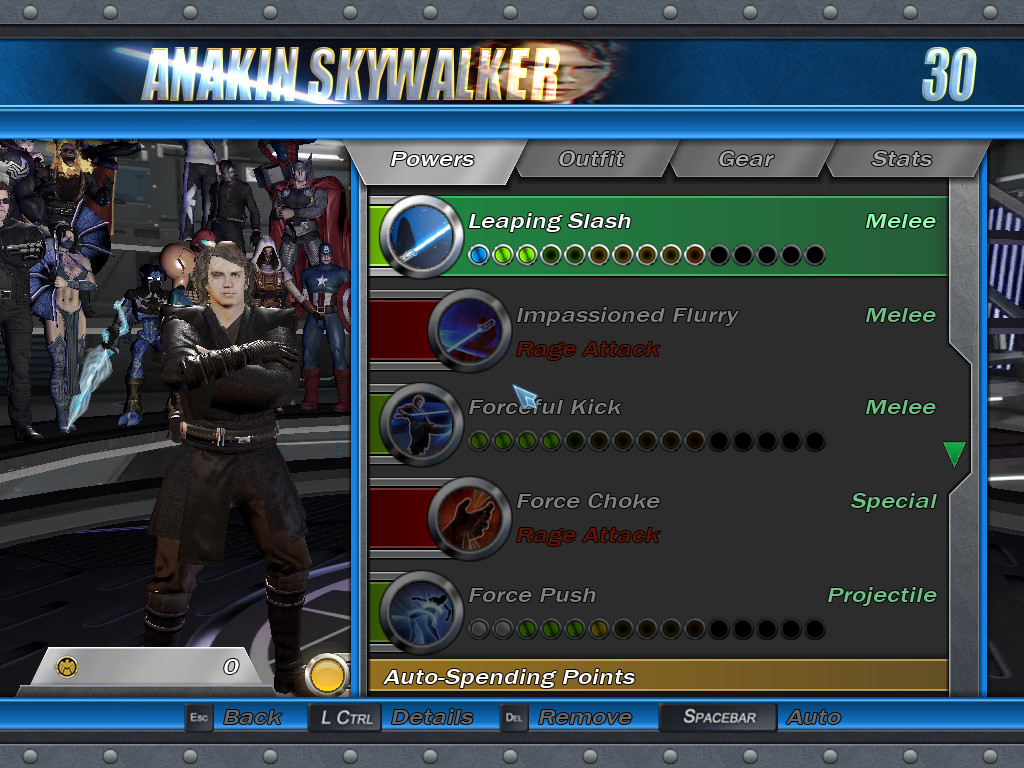
Anakin Skywalker—The Chosen One Booster
Hey everyone! A while back I made a mini-booster to give Spaceman's Anakin Skywalker mod more sounds as well as some effects tweaks, but I never really was satisfied with the finished product. So, without further delay, here's the Anakin Skywalker—The Chosen One booster!
Original Mod Download Link (Required): https://marvelmods.com/forum/index.php/topic,11266.msg204629.html#msg204629
Download Link: https://mega.nz/file/GZ8knTqQ#Q_eu-ym67z83l3oUPooAN9fqyjIWAHg7Y-Ox19tNziE
Features:
-Completely overhauled moveset that pays homage to his skillset from both the films and the Expanded Universe.
-A new voicepack featuring Hayden Christensen's performance from Episode II and Episode III of the Star Wars Prequel Trilogy (Matt Lanter and Matt Lucas's respective Clone Wars voices have been preserved in the extras folder).
-New Icons from Galaxy of Heroes
-New effects and animations.
-New sounds from the Revenge of the Sith video game.
-Music from the Star Wars Prequels (press block and smash to activate).
-Removed the skin swap feature of his rage mode, freeing up an additional skin slot for Anakin.
-Reworked/Re-incorporated the ElderSkrull's previous push/pull block combo additions from his booster into the mod proper as their own powers, freeing up triggers.
-Projectile Blocking, Force Dashing, and Force Leaping block combos.
Credits:
Outsider: Wolverine Booster XTreme effect and coding
Professor Escanor: Additional MFF animations
Ceamonks: Additional Coding Help
TubularSpaceman: Original Mod and Assets, Matt Lanter voicepack
Miles838: Matt Lucas voicepack
#39
Mod Releases and Conversions / Re: JC's mods
Last post by superhiepsi - October 21, 2026, 09:22PMBWA-Ha-HA! Pack:
BLUE BEETLE AND BOOSTER GOLD
BLUE BEETLE AND BOOSTER GOLD
At long last, the Blue & Gold team arrives to MUA! Probably arrived from another reality to save this one, or something.
Mod Numbers 197 (clash with Havok & Mileena) and 198 (clash with Emma Frost & Kamen Rider decade)
Ted Kord Blue Beetle is 150 triggers, Booster is around 120.
Get pack HERE:
https://www.dropbox.com/scl/fi/ogzse6gkfs63fzui8rta3/BWAHAHA-pack-by-JC.zip?rlkey=33ofxnrexooeqv3dsclf9moqa&dl=0
CREDITS
JC/ Superhiepsi - mod coding, custom skins
Guiguis12 - models, main skinner
BLaw, Cabral, Escanor - additional skin conversion
Spacedude - Captain Marvel voice/sounds for Booster Gold
Ceamonks - Nathan Drake voice/sounds for Blue Beetle
POWERSETS
Beetle
Passives: Flight (hanging off the Bug)
1 - BB Gun (Projectile) - knockback cone
2 - BB Grapple (Projectile) - pull an enemy in with the BB gun
3 - Acrobatic combat (radial melee) - trip all surrounding enemies
4 - BB Flash (projectile) - Blind/stun enemies in a con
5 - Scarab Spell (radial) - Unleash the Khaji Da, dealing magic lightning damage in a radius
6 - Sensor goggles (boost) - sense enemies + increase crit chance
7 - Genius gadgets (boost) - give gadgets to all teammates, increasing power levels
Xtreme - The Bug - Call on your ship to rain plasma all around
Booster
Passives: Flight, Might
1 - Fullback Dive (charge) - flying football maneuver, smashing foes away
2 - Force Field Smash (Radial) - crush enemies with his force field, as he did for his JL admission test
3 - Energy gauntlets (Beam) - charged energy blast
4 - Phantom zone projector (special) - crush enemies between dimensions and send them to the Phantom Zone
5 - Future Self (summon) - Booster arrives from the future to warn himself and help change history
6 - Force Field (boost) - bonus to Defense stat
7 - skeets (boost) - call your robotic sidekick to increase healing and energy regen
Xtreme - Convergence - trap surrounding enemies in time
NEEDS
Still need proper models for Skeets and the Phantom Zone Projector, using stand-ins for now
#40
Mod Releases and Conversions / Re: Arthur2600 Stuff
Last post by GenisVell - October 21, 2026, 08:14PMHello Arthur, your Venom mod is great and allows him to be used in teams of 4 much more easily, thank you. I wonder, though, if his Xtreme might have some coding error, because even though the animations all work wonderfully, the other characters' Xtremes do only "1" damage whilst his is the only one on the team that does full damage. It doesn't break the game and the animations work normally, it's just that his Xtreme is the only one that does damage, and that doesn't happen if he's not in the team. Would you know any way to fix this?
*Edit: I tried editing the powerstyle.engb file and inserting the original Xtreme coding instead, to no avail. I wonder if this is only happening with me or not.
*Edit: I tried editing the powerstyle.engb file and inserting the original Xtreme coding instead, to no avail. I wonder if this is only happening with me or not.